How to Simplify Community Association Finances
For community associations, maintaining financial transparency and compliance is critical to their success. A well-prepared audit not only ensures...



.svg)

Numa AI
Intelligence, Built In.
Built into the workflows your team already uses to reduce manual work, deliver faster answers, and help your team scale confidently.
Learn more about Numa AI
5 min read

If you manage an HOA or community association, chances are a spreadsheet sits at the center of your HOA work orders and maintenance operations. It might be a shared Google Sheet with color-coded rows or an Excel file passed between board members and vendors.
For a while, it works...
Until it doesn’t.
But as your communities grow, cracks start to show. Requests get missed, updates fall behind, and no one has a clear, real-time view of what’s actually getting done.
Spreadsheets aren’t built to manage work. They’re built to store information.
This is where many teams start looking beyond spreadsheets. Not for more tools, but for a better way to run the work itself. And managing work orders isn’t just about tracking data. It’s about coordinating people, timelines, and accountability across every community you manage.
📌 How do you manage HOA work orders without spreadsheets?
Community association managers can improve work order tracking and execution by using a system that:
✓ Captures all requests in one place
✓ Automatically assigns tasks
✓ Tracks progress in real time
✓ Enables field updates with photos and notes
✓ Keeps communication tied to each work order
Spreadsheets are familiar, flexible, and free. That’s exactly why so many associations default to them. But that convenience comes with a cost.
Spreadsheet error rates can be surprisingly high. A leading study found errors in a large percentage of real-world spreadsheets, with some analyses showing error rates between 20% and 90% depending on complexity. A review cited by Thales Group found that nearly 90% of spreadsheets contain errors.
In property management, those errors don’t stay theoretical. They show up as missed maintenance requests, duplicated or delayed work, and tasks that quietly fall through the cracks when versions don’t match. What starts as simple tracking quickly turns into constant follow-ups, unclear ownership, and work that doesn’t get done when it should.
Then there’s the time cost.
According to a survey by Zapier, the average knowledge worker spends roughly 12 hours per month on spreadsheet-related tasks like formatting, fixing formulas, and consolidating data. For a community manager juggling multiple properties, that’s time taken directly away from coordinating vendors, responding to homeowners, and keeping communities running smoothly.
And most of all, there’s the accountability gap. Spreadsheets don’t send reminders, enforce process, or make ownership clear. They can’t tell you who owns what’s next or what’s been missed. So when a homeowner asks for an update, the answer too often starts with: “Let me check the spreadsheet.”
Work order management in community associations isn’t simple task tracking. It’s coordination across people, properties, and priorities.
Multiple stakeholders, limited time
Board members are volunteers. They aren’t checking a spreadsheet daily. Approvals stall because the information isn’t where they are.
Operational complexity across communities
Pools, landscaping, roofing, parking, elevators. Each with different vendors, schedules, and urgency. According to the Community Associations Institute, 75 million Americans live in community associations, all relying on consistent maintenance and oversight.
Deferred maintenance risk
When work orders slip, small issues turn into expensive ones. Missed routine maintenance doesn’t stay small for long.
Rising homeowner expectations
Residents expect updates, transparency, and responsiveness. Manual communication doesn’t scale, and spreadsheets don’t provide visibility.
This isn’t just task management. It’s operational coordination. And that’s where spreadsheets start to break.
Moving beyond spreadsheets isn’t about adding complexity. It’s about replacing manual coordination with a system that runs the workflow for you.
Here’s what that looks like in practice:
Instead of requests coming in through email, calls, texts, and notes, everything flows into a single system.
Nothing gets lost. Nothing gets duplicated.
With platforms like Enumerate Central, requests are captured in one place and can be reviewed, prioritized, and turned into actionable work without re-entering information.
In a spreadsheet, assignments are manual. Someone has to decide, update, and follow up.
In a system, assignments become part of the workflow.
Work orders are organized in one place, making it easier to assign vendors, track ownership, and keep work moving. Managers can quickly assign the right vendor and send the work order directly from the system, without relying on spreadsheets or disconnected email threads.
One of the biggest hidden costs in operations is status checking.
"Where is this?"
"Did the vendor start?"
"Is this done?"
A structured system answers those questions automatically.
With Enumerate Central, HOA work orders move through defined stages, and everyone sees the same status in real time. No emails. No chasing.

Most spreadsheet workflows break down in the same place: the field.
The actual work doesn’t happen in a spreadsheet. It happens on-site.
A better system, like the Enumerate FieldOps mobile app, allows managers and inspectors to:
✓ Capture issues in real time
✓ Attach photos and notes on-site
✓ Document violations
✓ Sync everything back to Enumerate Central automatically
No retyping. No lost context. No “I’ll update it later.” Stay connected to the work order from start to finish.
Instead of scattered email threads, updates stay connected to the work order itself.
Vendor communication, notes, and progress all live in one place, so anyone can see what’s happened without digging through inboxes.
At a certain point, the real challenge isn’t one work order. It’s all of them.
"What’s open?"
"What’s delayed?"
"Where are we falling behind?"
With Enumerate Central, teams get a real-time view across their entire portfolio, making it possible to manage proactively instead of reacting to issues as they surface. That level of visibility is what separates basic tracking from true work order management software.
Moving off spreadsheets doesn’t have to be disruptive. In fact, the best transitions are simple.
Spreadsheets worked when operations were smaller and expectations were lower.
That’s no longer the reality.
Communities are more complex. Work volumes are higher. And the cost of missed work is too big to ignore.
A modern system doesn’t just replace a spreadsheet. It changes how work gets done:
✓ Requests are captured and resolved faster
✓ Vendors are easier to manage and hold accountable
✓ Boards have visibility without extra meetings
✓ Managers spend less time tracking work and more time managing communities
That’s not a tool to upgrade. It’s an operational shift that allows managers to scale without losing visibility or control.
Key takeaway: Managing HOA work orders at scale requires more than a tracking tool.
If your current system doesn’t automate assignment, provide real-time visibility, and keep communication tied to the work, it’s likely slowing your team down—not supporting it.
Enumerate Central manages work orders, violations, inspections, architectural requests, and CC&Rs in one place.
The Enumerate FieldOps mobile app extends that system into the field, making it easy to capture updates, document work, and keep everything in sync without returning to the office.
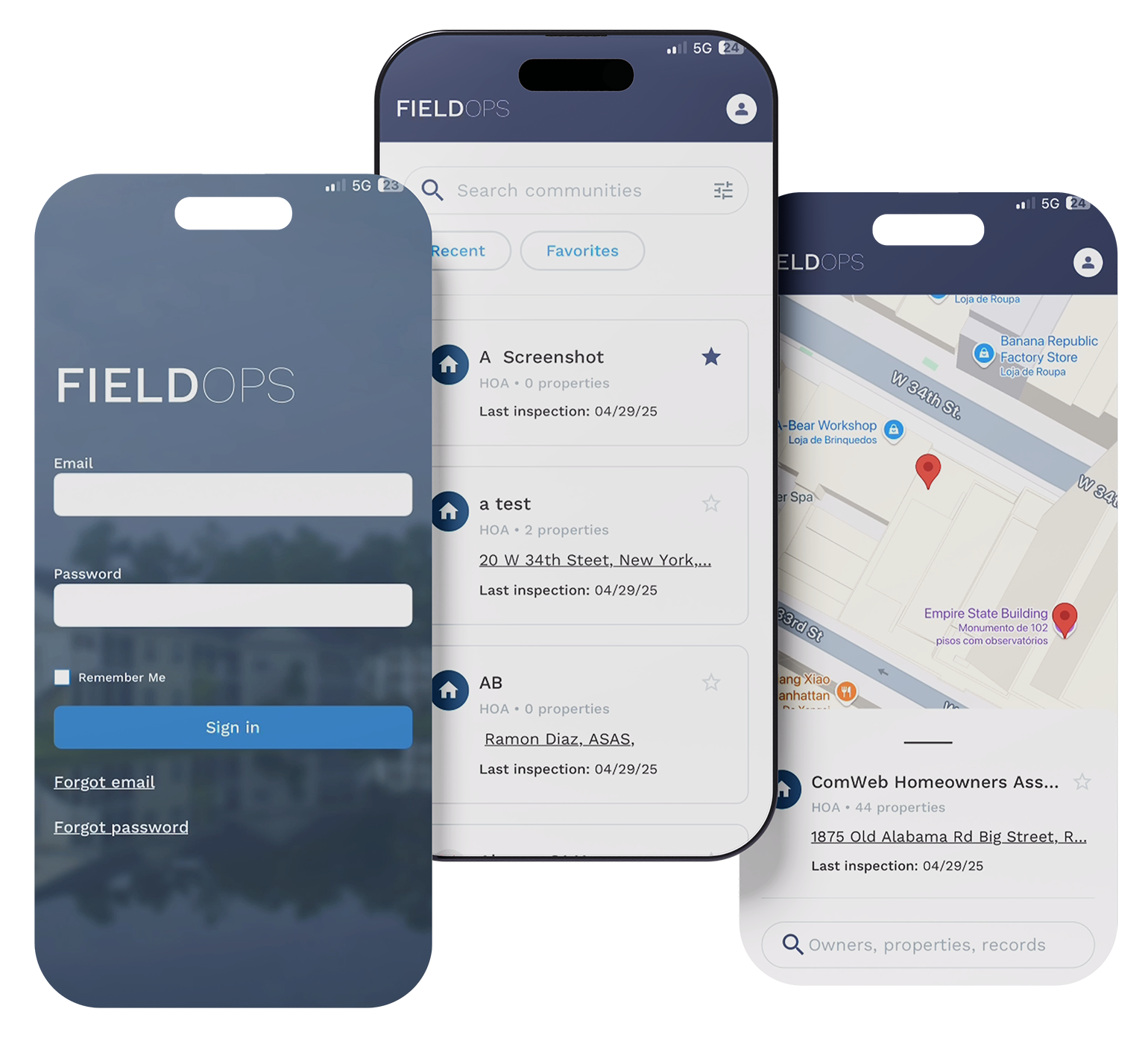
If your team is still relying on spreadsheets, you’re spending hours chasing updates, duplicating work, and risking missed tasks. It’s time for a connected operations system that keeps every request, every update, and every team member on the same page.

For community associations, maintaining financial transparency and compliance is critical to their success. A well-prepared audit not only ensures...

Change doesn’t have to be hard—especially when it makes your workday faster and easier. That’s exactly what Enumerate Central delivers. Our...
Spring is finally here! For community managers and HOA management professionals, it's the perfect opportunity to breathe new life into the...