One system to run your communities. Accounting, payments, operations, communication, and services all work together so your team can get more done with less effort.
Numa AI
Built into the workflows your team already uses to reduce manual work, deliver faster answers, and help your team scale confidently.
Learn more
Solutions
Software for accounting, payments, and operations in one connected system so you have clear, confident control of every community.
Who We Serve
For the teams and leaders who run community associations.
Resources
Guides, webinars, and support resources to help you understand, evaluate, and get more from Enumerate.
OCTOBER RELEASE
Less manual work,
wherever it happens.
So much of managing a portfolio is the same task, over and over: one more community to check, one more invoice to pay. This month, we’re taking more of that off your team's to do list.
Live October 20: We're starting with a roundup of recent fixes. Next, routine invoices become payments automatically, and your team can see and resolve failed vendor payments in one place. For Numa AI customers, Ask Numa now answers questions across your whole portfolio, seven new agents draft late fees, interest, and requests for your team to approve, and PDF bank statements go straight into AI Bank Reconciliation.
WEBINAR · WED, OCT 21 · 1 PM ET
Ask Numa Goes Portfolio-Wide
See how you can compare AR, delinquency, cash position, work orders and more across every community you manage — then quickly zero in on what needs attention. We’ll show you how it works and where it can help, from board season to everyday portfolio management. Save your seat. If you can't make it, register anyway and we'll send you the recording.
Small fixes and improvements
Not every improvement makes it into a feature announcement, but that doesn't make it less important. Starting this month, we'll share highlights from the small fixes and improvements we've made since each release. Here's what's new since September:
- Lockbox: A setup issue in one community no longer stops lockbox downloads for the rest of your portfolio.
- Statements: Communities using Consolidate Group Owners can generate statements again.
- Work orders: Work orders, photos, and notes now stay in sync between Central and Engage.
- Payment reminders: Daily reminder emails now send reliably in every community.
- Online payments: Homeowners who pay through Enumerate Payments now return to Engage, not an error screen.
Faster, clearer vendor payments
Turn approved invoices into payments automatically with Straight Through Processing
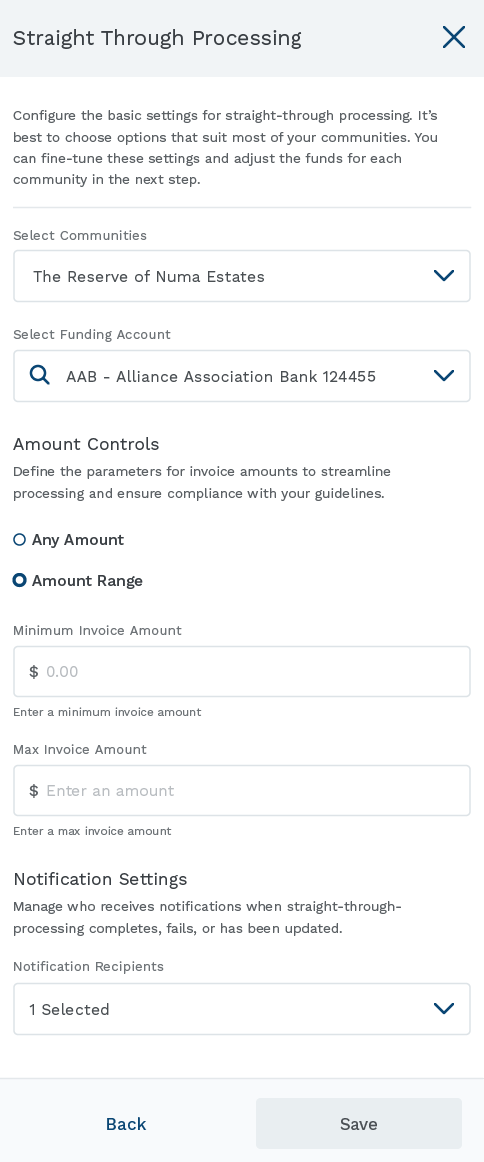
Straight Through Processing creates payments for eligible routine invoices as soon as they get final approval, so they don't go back to your team to be released. Your team sets the rules for each vendor and community and can apply them across several communities at once. Exceptions still go to manual review, and an audit trail records every rule change, eligibility decision, and payment outcome.
Why it matters
The same vendors send the same invoices every month, and someone still has to create each payment by hand. With Straight Through Processing (STP), the routine payments are handled automatically, and the exceptions still come to your team.
Who's impacted
AP specialists, controllers, finance directors, and community managers who approve vendor invoices.
How to use it
Central suggests vendors you've paid the same amount several times. From the vendor profile, open Actions and select Manage STP. Choose the communities, funding account, amount limit, payment timing, and who gets notified. Invoices over the limit, on hold, or with a changed payment method go to manual review, and Central tells you the reason.
See and resolve failed vendor payments in one place
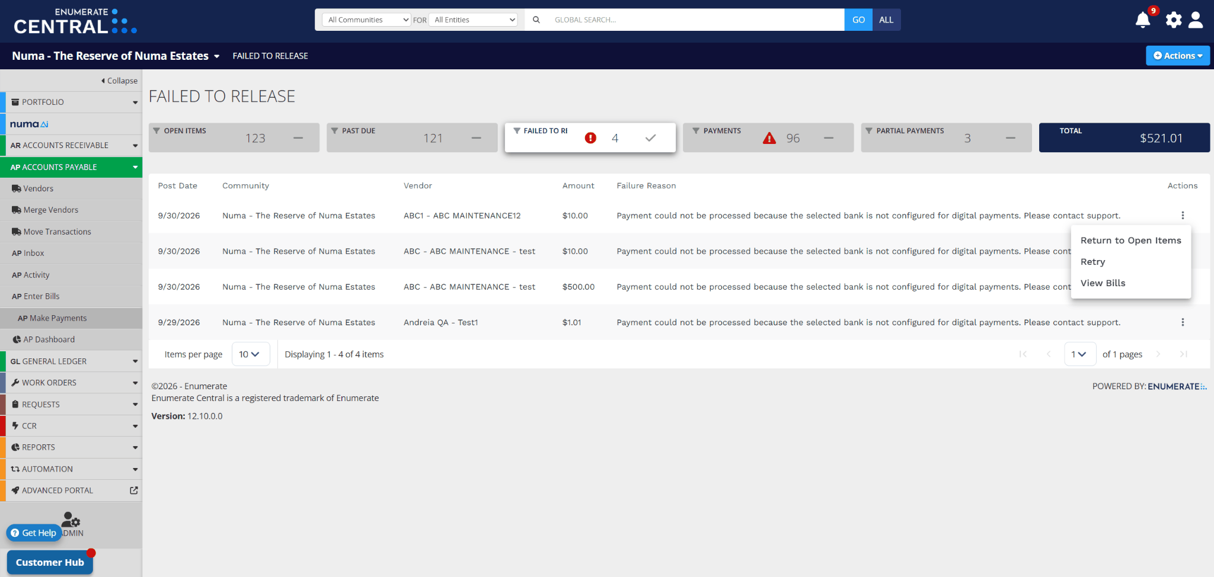
Central now shows any vendor payment that couldn't be released in the Failed to Release view. You can see the reason and choose what to do next.
Why it matters
When a payment can't be released, your team needs to know quickly, understand why, and fix it before the vendor has to follow up. Now all of that happens in one view, so you don't have to track it down.
Who's impacted
Controllers, AP specialists, and property managers who send vendor payments.
How to use it
There's nothing to set up. Open the Failed to Release view to see the reason for any payment that couldn't be released. From there you can choose Retry, Return to Open Items, or View Bills.
Ask Numa does more
The following capabilities are available exclusively to customers with the Numa AI package. Learn more about Numa AI or talk to your Customer Success Manager about adding access.
Ask Numa Portfolio Insights
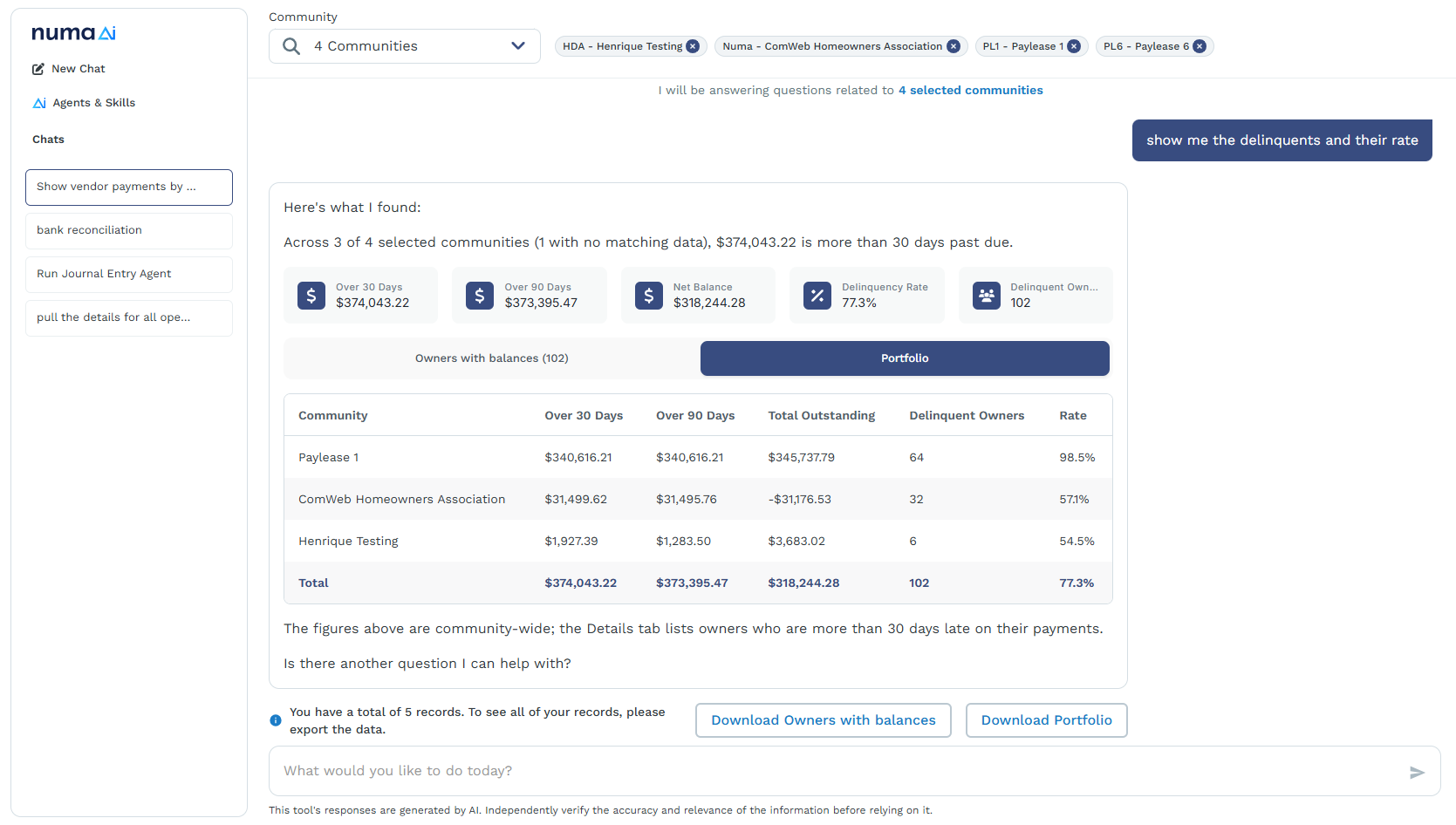
Ask Numa can now answer questions across all of your communities (or a group you choose) in one go. You get a portfolio-level total plus a breakdown by selected community. To start, you can ask about AR, delinquency, work orders, cash position, general requests, violations, and payments.
Why it matters
Managing several communities often means asking the same question of each, then putting the answers together yourself. Now one question does the job, and the breakdown by community shows where to look first.
Who's impacted
Property managers and portfolio managers who manage more than one community, plus the accounting managers and operations leaders who support them.
How to use it
Ask Numa a question that covers your portfolio, such as which communities have the highest delinquency. You can also name a specific community. Each answer lists which communities were included, excluded, or unavailable. Portfolio answers are read-only.
Meet 7 New Numa AI Agents
Seven new agents join the team in this release, bringing the total to eleven. They draft tasks and hand work back to your team for approval. As before, nothing changes in Central until someone says yes.
- Late Fees Agent: Numa drafts a late-fee batch with your assessment codes, grace periods, and posting options for you to adjust, then you confirm it and review or schedule it in Central as usual.
- Apply Interest Agent: Numa drafts an interest batch for delinquent owner balances, with your codes, delinquency date, grace period, rate, and the owners to include. You review it before it's accrued, then approve it for posting or schedule it.
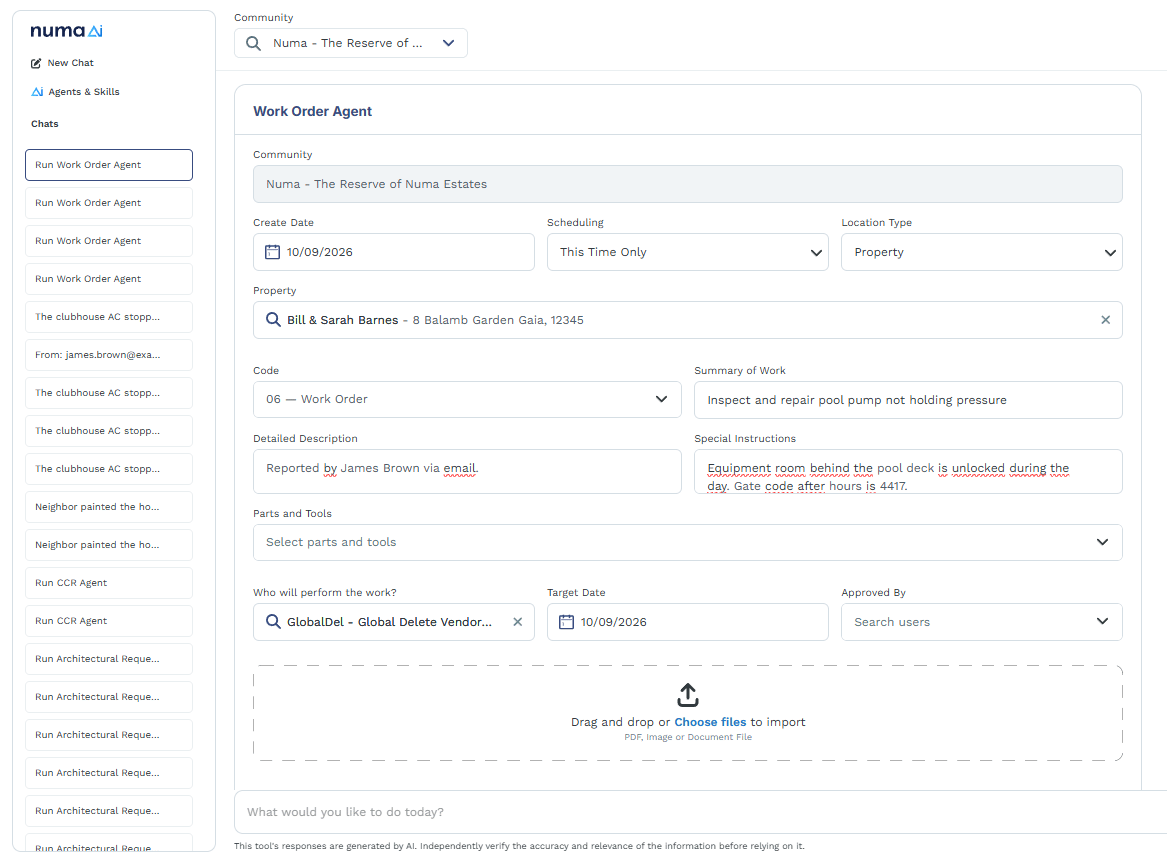
- Orders & Requests Agents: this group includes the General Requests Agent, Service Requests Agent, Architectural Requests Agent, CCR Agent, and Work Order Agent. Create requests and work orders without leaving Ask Numa.
Why it matters
Every cycle, someone has to apply late fees and interest community by community. That means checking codes, grace periods, and rates, because a mistake ends up on a homeowner's account. Meanwhile, service requests, architectural requests, CCRs, and work orders keep coming in, each one entered on its own screen. None of it is hard, but all of it takes time.
Who's impacted
Controllers, accounting managers, and AR teams with access to Numa AI who handle late fees and interest. Also community managers and staff who handle requests and work orders.
How to use it
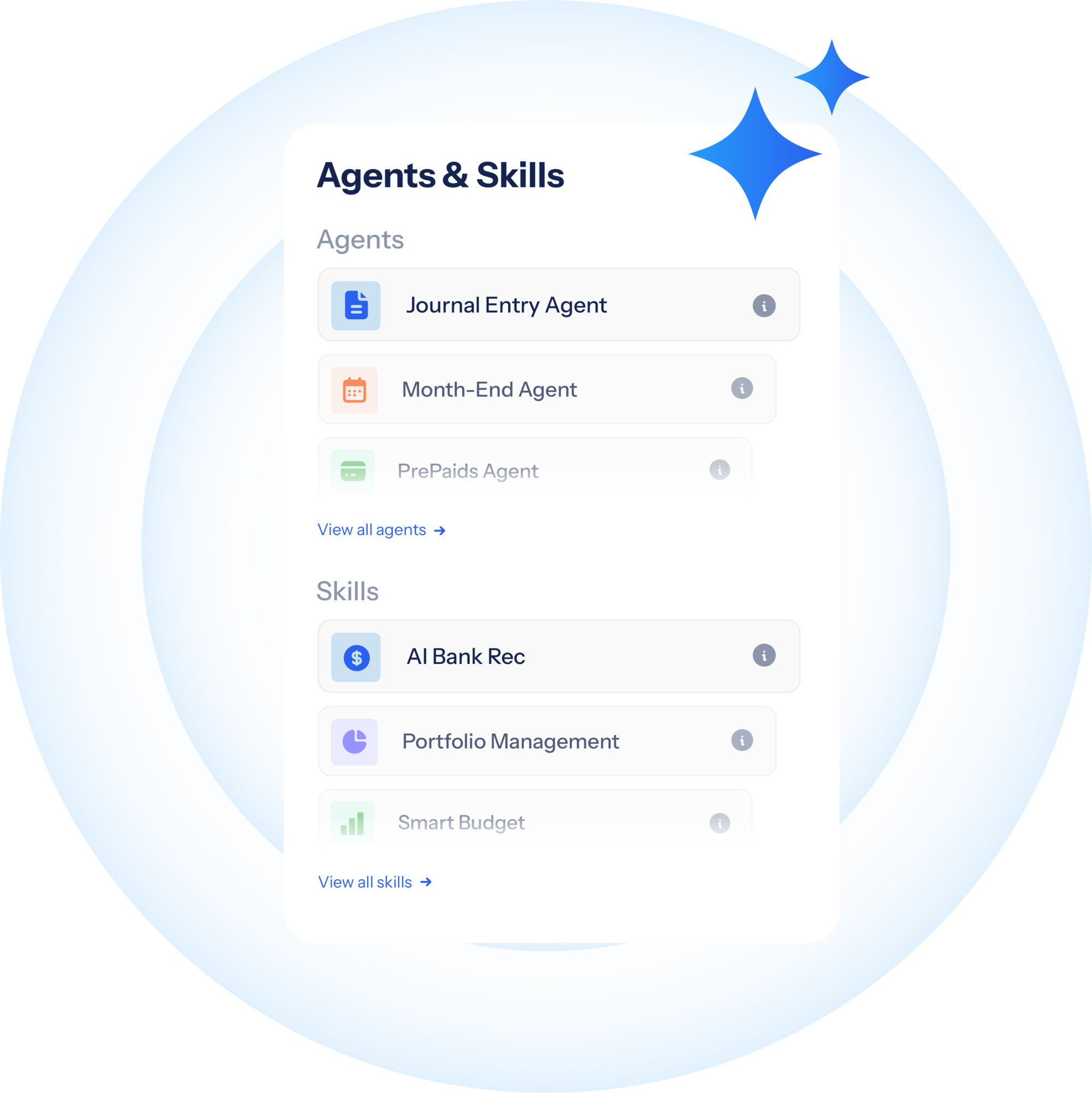
Start an agent in a conversation with Ask Numa or from the Agents & Skills panel in Central. Review the drafted fees, interest, or requests, then approve or edit them before they post. Nothing goes through without a person signing off.
Pictured:
Orders & Requests Agents | Work Order
Faster reconciliation, more control in Engage
Available with the Numa AI package.
Reconcile accounts that only come with PDF statements
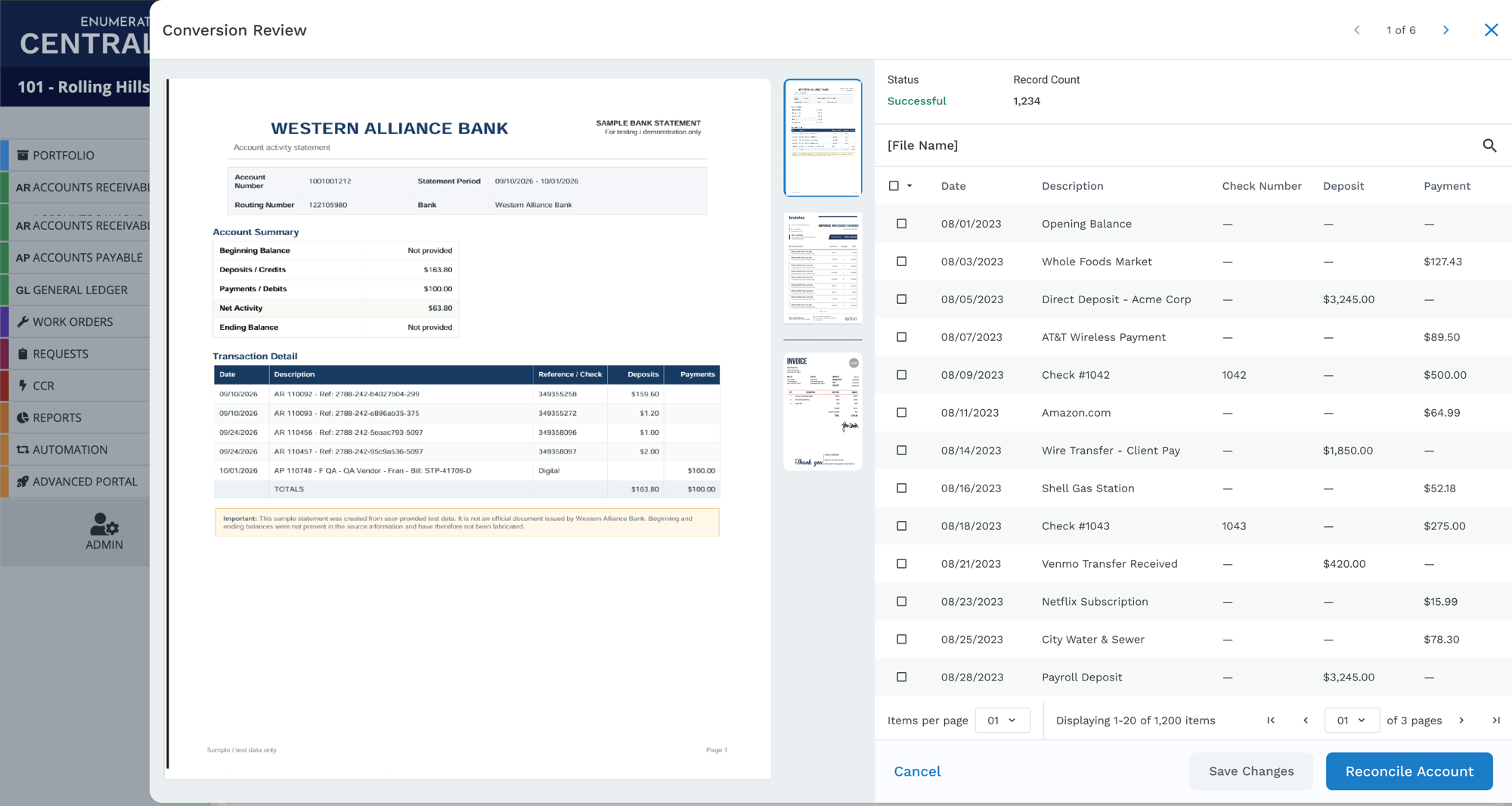
The AI Bank Reconciliation Skill now accepts PDF bank statements. Upload the PDF in Central, and it's converted into a BAI2 file. Review the file and the validation report, and nothing enters reconciliation until you confirm it.
Why it matters
Some banks only provide PDF statements, which used to mean converting files in a separate tool before you could start reconciling. Now that preparation happens in Central, and you review the transactions before they go into reconciliation.
Who's impacted
Community association managers, property accountants, and controllers with access to Numa AI who reconcile bank accounts.
How to use it
In the AI Reconcile Account drawer, drag in or browse to a PDF. Check the validation summary and the transactions it extracted, then select Reconcile Account.
Match transactions exactly before AI starts
Bank reconciliation now uses Zego transaction IDs and payment details to match transactions before AI processing begins. Exact matches skip AI processing, and everything else goes through the AI workflow as before.
Why it matters
Transactions that Central can match by an exact ID shouldn't need AI to decide on them. Settling those first leaves AI with only the transactions that need it.
Who's impacted
Community association managers, property accountants, and controllers who reconcile bank accounts with Zego payments.
How to use it
There's nothing to set up. Exact matching runs automatically at the start of reconciliation.
Find communities by the AI features they use
The Advanced Search filter in Engage can now find communities based on whether Manager Assist or Homeowner Assist is turned on.
Why it matters
As more communities turn on AI features, it gets harder to keep track of which community has what. Now one search answers that question, without opening each community.
Who's impacted
Portfolio managers, administrators, and community managers who manage Numa AI across communities.
How to use it
Open Advanced Search in Engage and filter communities by whether Manager Assist or Homeowner Assist is turned on.
Turn off Homeowner Assist escalation emails by community
Community managers can now turn off Homeowner Assist escalation emails in Engage for individual communities.
Why it matters
Each community runs a little differently. Now notifications can follow how each team actually handles escalations, instead of using one setting for everyone.
Who's impacted
Community managers at communities using Homeowner Assist.
How to use it
Open the community's notification preferences in Engage and turn off Homeowner Assist escalation emails.